Importing Product Reviews from a CSV File
Last updated on January 23, 2025
The Vitals Product Reviews app makes it simple to import reviews by uploading them via a CSV file. Follow these steps to successfully import reviews into your store.
Step 1: Download the CSV Template
- Download the empty template: vitals-reviews-template.csv.
Step 2: Fill in the Required Fields
Use the template to add your reviews. Below are the fields explained in detail:
| Field | Description |
|---|---|
| product_handle | The Shopify product handle. Example: If your product URL is https://yourshop.myshopify.com/products/awesome-product , the handle is awesome-product . |
| state | Determines if the review is published or in the moderation queue. Possible values: published or unpublished . |
| rating | The star rating for the review, between 1 and 5 . |
| title | The review title (used for compatibility with other apps but not displayed in Vitals). |
| author | The name of the reviewer. |
| The reviewer's email address. | |
| location | The reviewer's location (used for compatibility with other apps but not displayed in Vitals). |
| body | The content of the review. |
| imageUrl | URL of the review image(s). For multiple images, separate URLs with commas. |
| reply | If the merchant replied to the review, include the reply here. |
| created_at | Date when the review was created. Format: YYYY-MM-DD HH:MM:SS (e.g., 2019-10-01 09:50:00 ). |
| replied_at | Date when the reply was added. Format: YYYY-MM-DD HH:MM:SS . |
Mandatory Fields:
product_handleratingbody
Ensure these fields are never left blank.
Step 3: Upload the CSV File
- Open the Vitals Product Reviews app.
Navigate to the Import tab.
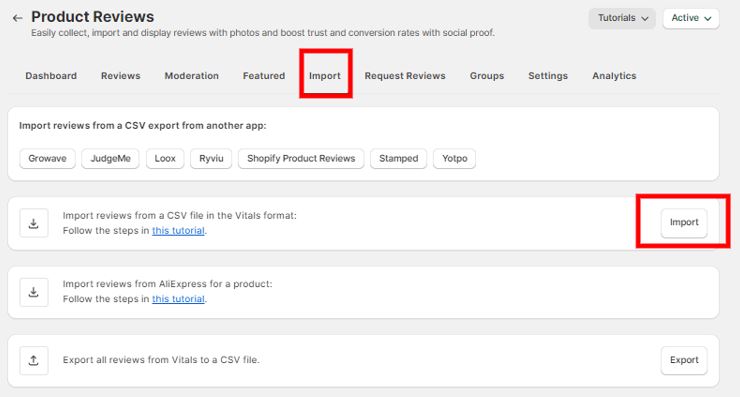
- Click the Import button and upload the completed CSV file.
Tips for a Smooth Import
- Use Recommended Editors: For better UTF-8 support and quoting, use tools like LibreOffice or OpenOffice, or Microsoft Excel.
When saving the file (in OpenOffice or LibreOffice), enable the "Quote all text cells" option to prevent cutting off review contents.
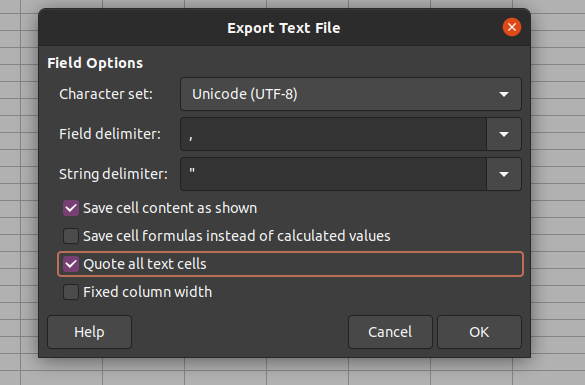
- Avoid Using MacOS Numbers: This application may corrupt CSV files. Use Excel or LibreOffice instead.
- For product handles with special symbols (e.g., ™️), save the file as UTF-8 CSV.
💡 Important Notes:
- Ensure reviews in the CSV are verified and genuine, as Shopify prohibits displaying fake or manipulated reviews according to their Acceptable Use Policy.
If you encounter any issues during upload, contact our support team. We can help review the file for errors and assist with re-uploading it.
Below are the different columns found in the different importer sources in the app. All the other columns can be empty, especially the "optional" ones.
Growave
| Field | Remarks |
|---|---|
| customer_name | |
| customer_email | |
| product_id | mandatory |
| product_handle | mandatory only if the product_id is empty |
| body | mandatory |
| rating | mandatory |
| created_at | mandatory |
| published | 1 or 0 only |
| reply | |
| images |
JudgeMe
| Field | Remarks |
|---|---|
| curated | ok = published/anything else = pending |
| rating | Mandatory |
| reviewer_name | |
| reviewer_email | |
| body | Mandatory |
| review_date | |
| product_id | Mandatory |
| product_handle | Mandatory |
| picture_urls | optional, comma-separated |
| reply | optional |
| reply_date | optional, ISO-8601 |
Loox
| Field | Remarks |
|---|---|
| status | Active = published/anything else = pending |
| id | |
| rating | Mandatory |
| nickname | |
| review | Mandatory |
| date | |
| productId | Mandatory |
| handle | Mandatory |
| img | comma-separated |
| reply | optional |
| replied_at | optional, ISO-8601 |
Ryviu
| Field | Remarks |
|---|---|
| status | automatically published |
| rating | Mandatory |
| author | |
| body_text | Mandatory |
| created_at | ISO-8601 |
| product_handle | Mandatory |
| photo_urls | JSON-encoded |
Shopify
| Field | Remarks |
|---|---|
| state | approved or published = published/anything else = pending |
| rating | Mandatory |
| author | |
| body | Mandatory |
| created_at | ISO-8601 |
| product_handle | Mandatory |
| imageUrl | comma-separated |
| reply | optional |
| replied_at | optional, ISO-8601 |
Stamped
| Field | Remarks |
|---|---|
| rating | Mandatory |
| author | |
| body | Mandatory |
| product | title, Mandatory |
| state | optional; published = published/anything else = pending |
| imageUrl | optional, comma-separated |
| reply | optional |
Yotpo
(note: The fields have spaces, and each field is mandatory to be in the CSV file)
| Field |
|---|
| Review Status |
| Review Score |
| Reviewer Display Name |
| Review Content |
| Reviewer Email |
| Review Creation Date |
| Product ID |
| Product Handle |
| Product Title |
| Published Image Url |
| Comment Content |
| Comment Date |
By following these guidelines, you can seamlessly import product reviews and enhance your store’s credibility! 🎉